
Is It Worth Repairing or Replacing Your Computer?
Whether to repair or replace your computer depends on the age of the device, the condition it’s in and the cost of the repairs. As a rule of thumb, if the repair costs more than 50% of the price of a new device, replacement may be the smarter option. Minor issues, like battery failures and software problems, are usually worth repairing. However, if software malfunctions and hardware issues are frequent, it might be time for a change. Having to meet compliance obligations and insurance as business owners are also determining factors in deciding if a new computer is a better option. Before making a decision, think about whether it will significantly impact the lifespan of the device or not.
What Affects Computer Repair Cost?
Everyone has a computer these days and everyone has problems with their computers sooner or later. This article answers the question of what affects the pricing on repairs and when it's a good time to seek a professional. There are many elements that will change the cost, which is why we’ll analyze them in our diagnostics check during intake. To put it simply, prices will vary depending on the type of problem, the device you’re using, and how quickly you need the repair done. At Top Notch Computers, we make sure to find any other problems that might be affecting your computer, not just the obvious ones or what a customer thinks needs fixed. Sometimes the safer, more logical results are a new computer instead of fixing the old one. Below we talk about what affects the cost of computer repair and how we can help examine and suggest the best solution for your individual needs.
Type of Problem
The type of the problem is the first and most important factor when it comes to computer repair prices. The first thing you want to know about is the nature of the issue. So, it’s either a software or a hardware problem. Software issues are bugs or errors in computer programs, and they cause unexpected behavior, crashes and performance degradation. This type of problem doesn’t require actual parts to be changed, which is why it’s typically cheaper. Hardware issues require parts to be changed, which means that the computer repair costs will be higher. The most common hardware issues are overheating, hard drive failure, power supply issues, connection failures, and motherboard issues. The age of the device is also a determining factor on whether a repair is the best option or replacing with a new one. We understand a new computer is a big cost and most people want to keep what they already invested in to last as long as possible. Once devices reach a certain age, cybersecurity updates become less frequent and eventually stop allowing new ones, which can leave you vulnerable and open to attacks. If you have to meet compliance requirements or hold personal information you don't want to be seen, sometimes a new computer is a better option than repairing the old one.
Laptop vs Desktop
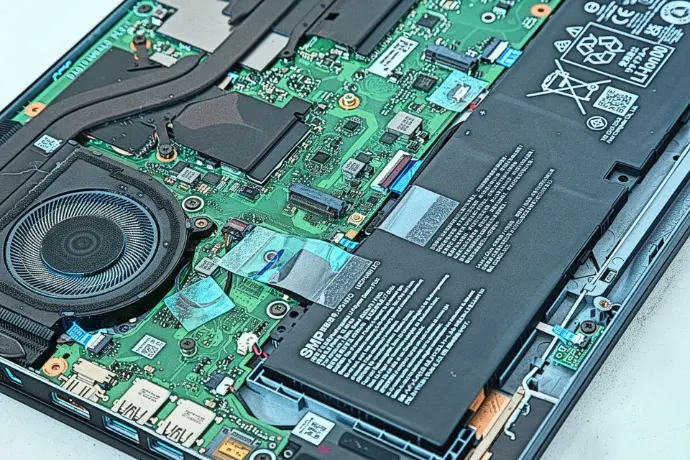
You might not know, but there is a big difference between the computer repair prices if you have a laptop compared to a desktop. When discussing computer repair cost, laptops are typically more expensive to fix. They are more challenging because of their compact and integrated components. On the other hand, desktop computers are faster and easier to repair. The components are easier to remove and replace, and they are usually more accessible and cheaper. We service both and would love to help with any hardware or software needs to keep your computer working for longer.
On-site vs In-shop Repair
In-shop repairs are usually cheaper because you are the one bringing the broken device into the shop. While on-site repairs are more costly, because the technicians come to your house or office. Therefore, the price also includes the travel costs. So, if you can take the device to the technicians, know that it is the cheaper option. We charge a diagnostics fee of $175 for non-managed clients (cheaper if you are a managed client) but waive that fee if you decided to move forward with our services. We do not start working on computers or order any parts till the quote has been sent and approved by the customer.
Parts and Labor
The cost of parts can vary significantly depending on several factors. These include the age of the computer, whether the manufacturer uses proprietary components instead of standard, and overall market availability. Pricing may also be affected by supply shortages, such as the current demand-driven constraints on RAM and SSD storage due to increased AI data center expansions. These are just a few of the many variables that can impact parts pricing.
Labor costs can also vary based on the complexity of the issue, whether the work is performed in-office or onsite, and the technician’s level of experience and qualifications. Installing a router is something simple, but installing a new server and network cabinet is going to take serious time.
How Top Notch Computers Keeps Repair Costs Transparent?
The key factor that differentiates Top Notch Computers from other companies is that transparency is actually prioritized. We want the client to be aware of the computer repair costs from the beginning. The process starts with a clear diagnosis assessment. The issue your device is facing will be clearly stated to the client, together with the possible solutions. As the client, you will receive an estimate of the price of the parts and labor, and the turnaround period. If additional issues are discovered during the repair, approval is requested before moving forward. Many services also come with flat-rate pricing for common problems, making costs easier to predict. We can promise clear communication and honesty between us and our clients.
Fun Fact: Our managed clients get discounted rates on all computer repair services. If you use our services, but aren't a managed client yet, schedule a free consultation with us to see how we can help your business with our managed services.
FAQs
Q: Do I Get a Price Estimate?
Yes, you will receive a price estimate before any repair is done. A quote must be approved before we order any replacement parts or start working on any solutions to fix your device.
Q: Do Repair Shops Charge for Diagnosis?
A: Most shops typically charge a fee to cover the technician's time used during the diagnosis. Our pricing for non-managed clients is $175 for a diagnostics fee. Our experts have been trained and utilize years of experience to ensure the problem is accurately defined. We then create a quote for the next appropriate steps recommended by our team. If you decide to use our services, we waive that fee and only charge you for the labor and cost of the parts. This allows us to use our best technicians to analyze and suggest the best steps forward and still get paid for their time.
Q: How Long Does a Typical Repair Cost?
A: Repair time depends on the issue and parts availability. The most common fixes take between 1 and 3 business days from the time the quote is signed. Delays can happen but we always keep our customers in the loop for any delays or back-ordered products.
Q: Does Top Notch Computers offer a warranty?
A: We do offer warranties and they vary based on the work and parts involved. All new parts and computers come with at least a year warranty. Our labor also includes up to a 90-day warranty for all computer repair services.